How EventGen AI Sets Up an Event: A Five-Minute Product Walkthrough
A first-hand walkthrough of how EventGen turns an event brief into a reviewable registration, portal, networking, and communications setup using confirmed AI actions.
By EventGen product team
Event software can describe a task without doing it. EventGen takes a different approach: the dashboard assistant proposes real configuration actions, shows them to the organiser, and waits for confirmation before it changes the event.
This walkthrough shows what that process looks like for an illustrative two-day B2B conference.
Evidence note: This is a first-hand product walkthrough based on the current EventGen dashboard workflow and real product captures. The event brief and resulting configuration are illustrative, not a customer case study. “Five-minute” describes a concise guided run, not a guaranteed completion time; the result depends on the event brief, the actions accepted, and the organiser's review.
Before you start
You need:
- An email address
- A rough idea of your event (type, size, attendee categories)
That's it. No credit card. No demo call. No "talk to sales" form.
Step 1: Sign up and describe your event (60 seconds)
Go to dashboard.eventgen.ai/signup and create your account. You'll land on your dashboard with the AI assistant ready.
Type something like:
"I'm organising a 200-person tech conference called FutureTech 2026. Two days, 15th-16th October. Three attendee types: speakers, sponsors, and delegates. I want hosted-buyer networking between sponsors and delegates, and open networking for everyone. Registration should collect company name, job title, and dietary requirements."
Or if you already have an event website, paste the URL:
"Here's my event website: futuretech2026.com - please set up registration and networking based on what you find there."
The AI reads the URL, extracts event details (name, dates, venue, attendee types), clones the golden event template that best matches your event, and applies what it found - so you start from a working configuration, not a blank page.
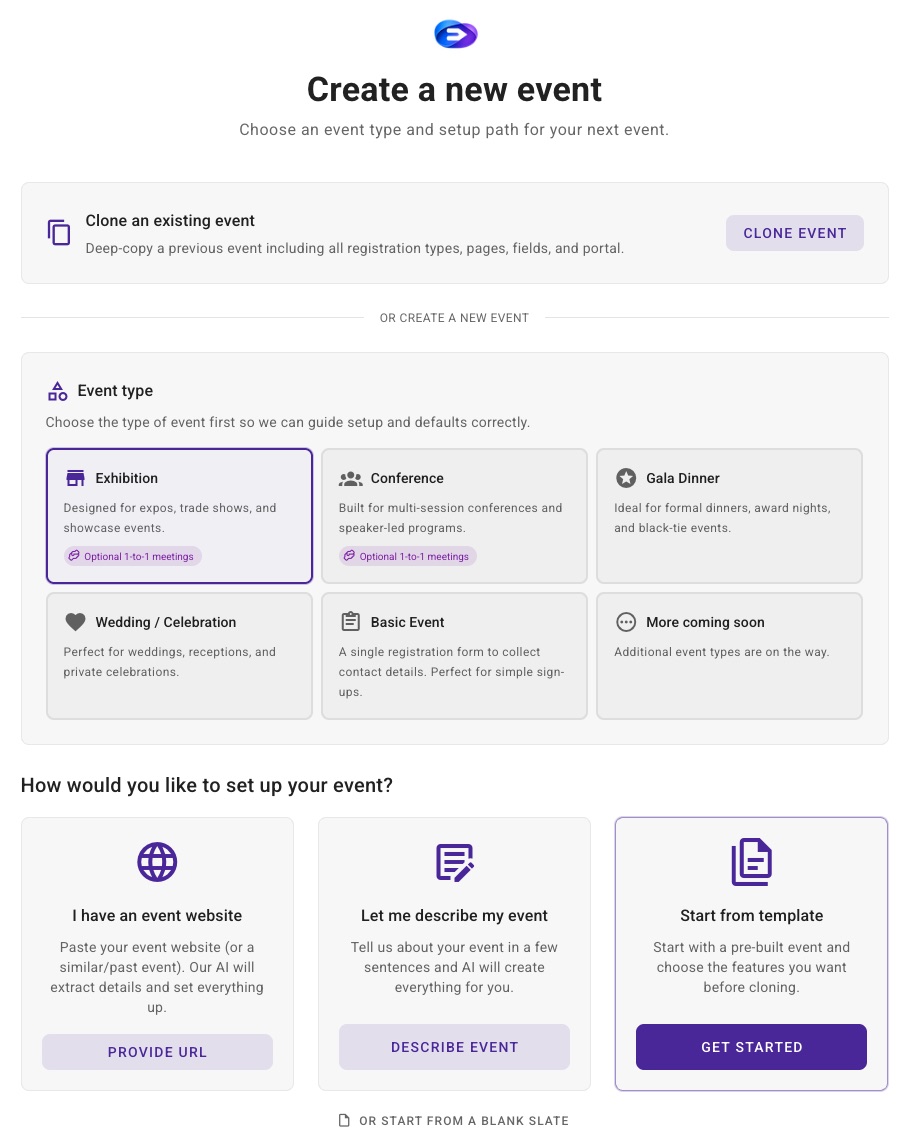
A real EventGen dashboard capture of the AI event-creation workflow.
Step 2: AI drafts your event (2 minutes)
The AI doesn't just acknowledge your request - it builds, in batches you approve. It proposes up to eight actions at a time, and you confirm each batch before anything is created. For this illustrative brief, the proposed setup can include:
Registration types
- Speaker registration with bio, headshot, session topic fields
- Sponsor registration with company profile, booth requirements, product categories
- Delegate registration with interests, networking preferences, dietary requirements
Registration flows
- Speakers require approval before confirmation
- Sponsors go through a team registration flow (one lead registers the company, then adds team members)
- Delegates get instant confirmation
Portal pages
- Home page with event branding, countdown, and key information
- Registration page with the appropriate form for each type
- Programme page (ready for sessions to be added)
- Networking page where attendees browse and request meetings
- Sponsors page showcasing sponsor profiles
Networking configuration
- Three networking groups: Speakers, Sponsors, Delegates
- Hosted-buyer relationship between Sponsors and Delegates
- Open networking enabled for all groups
- Matching criteria linked to product categories and interest fields
- Meeting slots: 30-minute hosted-buyer and 15-minute open-networking durations
Communication templates
- Registration confirmation (different for each type)
- Event reminder (7 days, 1 day)
- Networking schedule release
- Post-event thank you
You confirm each batch before it runs. Read-only steps happen automatically, but anything that creates or changes data waits for your approval. Reject anything you don't want, then ask for a change in plain language - "Actually, make sponsors require approval too" or "Add a field for T-shirt size" - and the AI proposes the next batch.
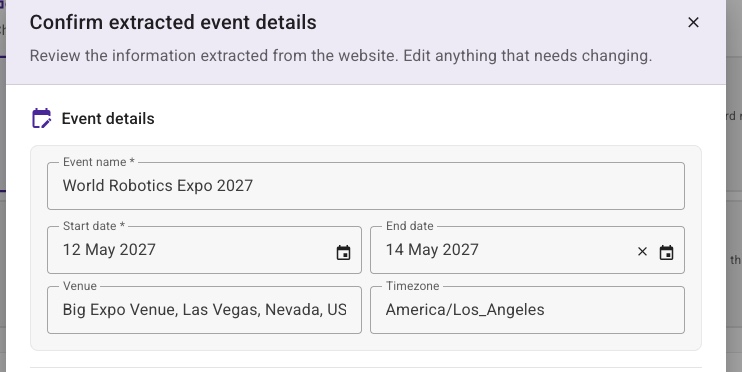
The organiser sees the extracted details and proposed work before confirming the change.
Step 3: Review and refine (2 minutes)
Everything the AI created is fully editable. Browse through each section and fine-tune:
- Registration fields - reorder, add conditional visibility, change field types
- Portal pages - adjust layouts, update copy, change colours to match your brand
- Networking - modify matching criteria, adjust meeting durations, set scheduling constraints
- Templates - edit the AI-drafted copy, add your own voice
You can also ask the AI for specific changes:
"Add an early-bird ticket at £99 that expires on 1st September"
"Change the portal colour scheme to match our brand - primary colour is #1A365D"
"Create a WhatsApp template for the networking schedule release"
Step 4: Test (optional but recommended)
Before publishing, test the full attendee experience:
- Preview your portal - see exactly what attendees will see
- Submit a test registration - walk through the flow end-to-end
- Test networking - browse profiles, request a meeting, check the scheduling
- Preview emails - see how your templates render
The Free plan includes two event activations per plan year, one live event at a time, up to 50 registrants per event, core event tools, and Networking Test Mode, so you can test the core event registration, event website, and organiser-only networking rehearsal without upgrading.
Step 5: Publish
When you're happy, publish your portal. Your event is live:
- Registration is open at your portal URL, or your own custom domain with automatic SSL
- Attendees can register, build profiles, and start networking
- Communications trigger automatically based on your rules
- You manage everything from your dashboard
What the illustrative run produces
A concise guided run can produce a useful starting configuration such as:
| Feature | What AI configured |
|---|---|
| Registration | 3 types with custom fields and different flows |
| Portal | 5+ pages with branded layout |
| Networking | Hosted-buyer + open, with matching criteria |
| Communications | 5+ templates with automated triggers |
| Payments | Ready for tickets and add-ons (if needed) |
The important evidence is not a universal timing comparison. It is that the resulting records are created inside the product, remain editable, and are subject to organiser confirmation rather than being presented as a chat answer that still has to be implemented manually.
What happens next
As your event grows:
- Add sessions to your programme - the AI can create a multi-track agenda from a list of topics and speakers
- Import contacts - the 5-step import wizard handles CSV files with duplicate detection
- Run matching - when registration closes, run the hosted-buyer matching algorithm to generate meeting schedules
- Monitor - your dashboard shows registration numbers, networking activity, and communication delivery in real time
What this walkthrough establishes
The captures and workflow demonstrate four product facts:
- EventGen accepts an event description or website URL as setup context.
- The assistant can propose executable dashboard actions rather than only return instructions.
- Organisers review and confirm write actions before execution.
- The created registration, portal, networking, and communications configuration remains editable in the normal dashboard.
This walkthrough does not claim that every event is complete in exactly five minutes, that the AI should replace organiser review, or that an illustrative configuration is ready to publish without testing.
For current allowances, networking access, currencies, and package prices, use the canonical EventGen pricing page.
Ready to try it? Sign up free and set up your first event in minutes. Core event tools and Networking Test Mode are included, with no credit card required.