Real registrants stay outside
For a non-Engage event in Test Mode, ordinary registrants cannot see or use networking. The rehearsal is available through trusted organiser imitation only.
Pre-flight networking rehearsal
Configure the networking experience, then use trusted organiser imitation to step through the registrant Portal as selected participants. Exercise the real journey without making networking or its communications available to real registrants, then add Engage when you are ready to launch.
Free and Base packages include bounded organiser-only Test Mode. Engage is required before real registrants can use networking.
The problem
Networking combines permissions, profile visibility, requests, responses, availability, places, schedules, and communications. A configuration can look complete in a dashboard while still feeling unclear when someone experiences it as a participant.
Networking Test Mode gives trusted organisers a practical pre-flight experience. They can move through the Portal as selected participants, test both sides of the meeting journey, and review the result without exposing unfinished networking to the real registrant audience. It is a safe way to evaluate the experience before committing to attendee-facing Live networking.
A protected rehearsal boundary
For a non-Engage event in Test Mode, ordinary registrants cannot see or use networking. The rehearsal is available through trusted organiser imitation only.
Networking communications are suppressed by default. Controlled Test delivery can be deliberately redirected only to verified organiser test recipients.
Attendee-facing Live networking requires Engage. A non-Engage organiser is prompted to upgrade at the Go Live boundary instead of silently exposing the Test experience.
How it works
Set up groups, directional relationships, profile privacy, request or wishlist forms, meeting places, slots, scheduling rules, and the Open or Curated Networking flow the event needs.
Choose a bounded set of participant profiles for the rehearsal. Real registrants remain outside networking while organisers use trusted imitation to experience the Portal.
Move between participant perspectives to create and receive meeting requests, confirm or decline them, build wishlists, schedule meetings, and test other relevant enabled workflows.
When the experience is ready, subscribe or upgrade to Engage and switch networking Live. EventGen removes disposable Test interactions while retaining the configuration needed for launch.
See it in action
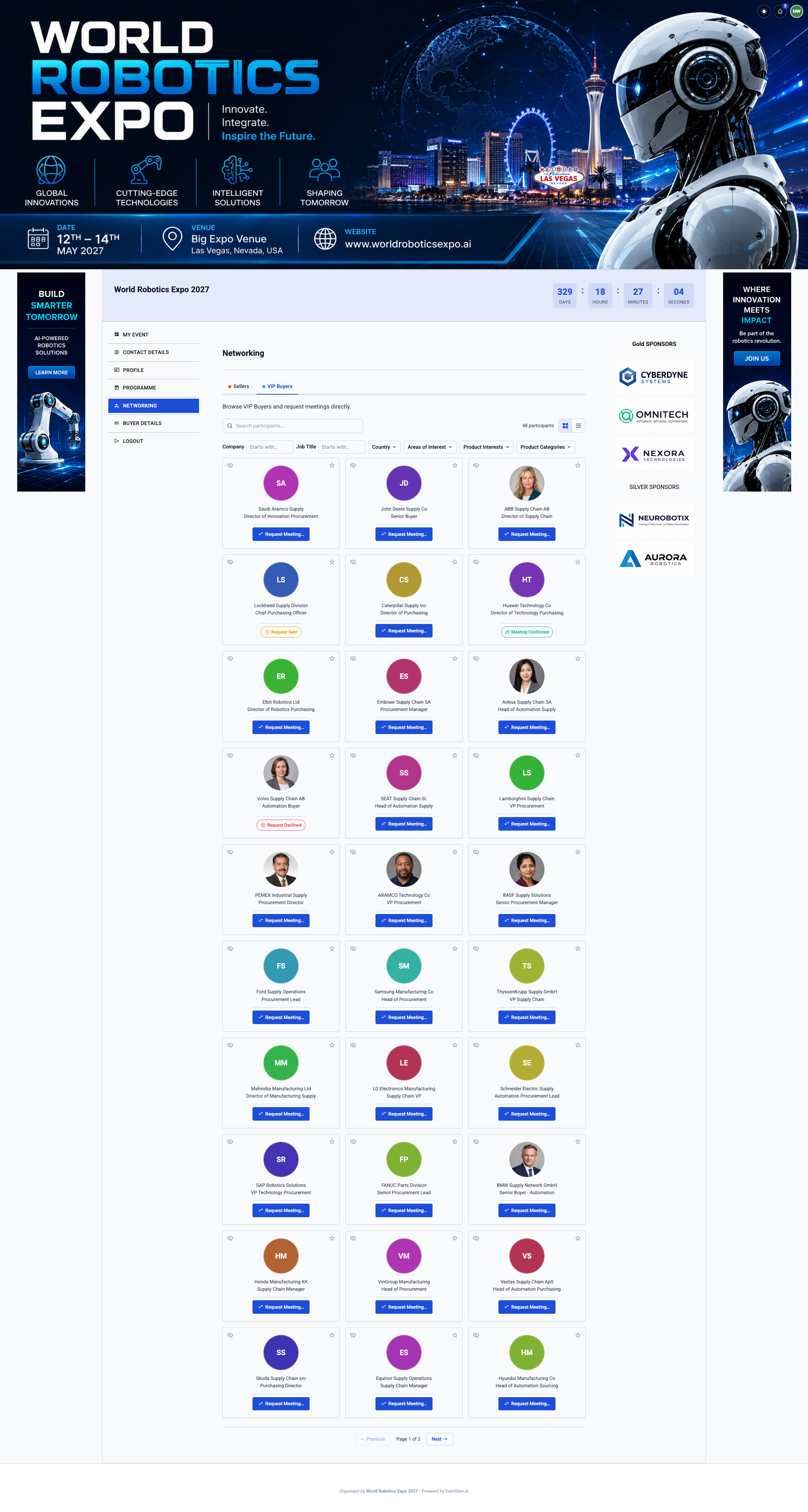
Trusted organisers can rehearse participant discovery and the available meeting actions in the same Portal journey prepared for launch.
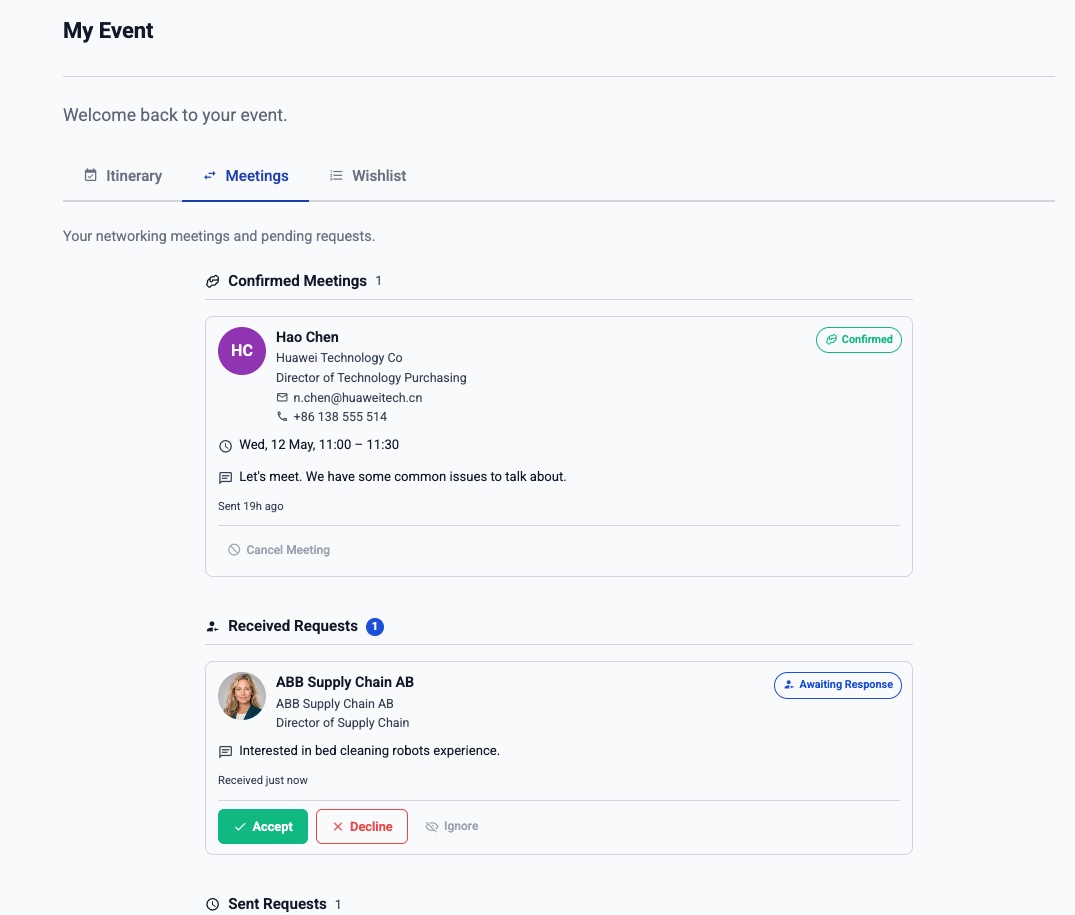
Imitate both sides to create and receive requests, confirm or decline, and check how meetings appear in each selected participant’s experience.
Capabilities
Authorised organisers experience the registrant Portal as selected participants instead of asking real registrants to try unfinished networking.
Create and receive requests, confirm or decline them, and exercise direct booking, another-time suggestions, rescheduling, or availability where the relationship configuration supports them.
Build participant wishlists and exercise the relevant matching, organiser review, curation, and scheduling stages before a curated programme is released.
Where AI Intent Matchmaking is configured, use the bounded Test allowance to evaluate natural-language searches and generations alongside the ordinary networking controls.
Test activity does not send ordinary networking communications to real registrants. Any controlled Test delivery must be deliberately redirected to verified organiser test recipients.
Test-created interactions are rehearsal data, not the launch meeting programme. Moving to Live removes them so the real event does not inherit artificial requests, wishlists, messages, or meetings.
The Test-to-Live transition keeps the networking configuration needed for launch, including the organiser choices that define how the real experience should work.
Non-Engage Test Mode has published participant and activity allowances plus operational safety controls. Engage organisers can rehearse at the scale of their real event and plan.
When to use it
Show event owners, sponsors, hosted-buyer teams, or operations colleagues the participant journey before asking them to approve it for launch.
Check that each participant type can discover, approach, and see only the people and profile fields intended for that direction and phase.
Rehearse attendee-led requests, organiser-led wishlists and matching, or both together using the event’s real networking configuration.
Review availability, places, conflicts, schedules, and controlled notification content before the real networking audience is admitted.
One connected platform
Prepare attendee discovery, requests, booking, availability, privacy, places, and personal itineraries.
Prepare wishlists, matching, organiser review, team assignment, scheduling, and controlled release.
Rehearse the qualified buyer–supplier journey, including participant preferences and one-to-one appointments.
Compare Base Test Mode with the Engage package required for attendee-facing Live networking.
Follow a practical rehearsal checklist from configuration through the Test-to-Live transition.
Networking Test Mode is EventGen’s bounded pre-launch rehearsal for non-Engage events. Trusted organisers imitate selected participants and exercise the real Portal and relevant organiser workflows while ordinary registrants remain unable to see or use networking.
Organisers can configure networking, move between selected participant perspectives, create and receive meeting requests, confirm or decline, build wishlists, schedule meetings, and exercise other relevant Open or Curated Networking workflows. The exact actions available follow the event’s networking configuration.
No. A non-Engage event exposes networking only through trusted organiser imitation in Test Mode. Real registrants cannot see or use it.
Test communications are suppressed by default. Organisers may deliberately redirect controlled Test delivery only to verified organiser test recipients, so real registrants do not receive the rehearsal traffic.
One non-Engage Test cycle supports up to 25 selected participants, 100 wishlist creations, 50 meeting creations, 250 peer messages, 25 curation runs, 100 AI searches, and 25 AI generations, subject to operational safety controls. Creation and use counters do not replenish when Test activity is deleted or cancelled.
Yes. Attendee-facing Live open or curated networking requires Engage. At Go Live, a non-Engage organiser is prompted to subscribe or upgrade rather than exposing networking to registrants.
After Engage is active, switching Live removes disposable Test interactions while retaining the networking configuration required for launch. The Test activity is rehearsal data and does not become the real meeting programme.
Yes. Free and Starter, Pro, and Enterprise Base packages include bounded organiser-only Networking Test Mode. Enterprise+ includes Live networking; Starter, Pro, and Enterprise require their Engage variant for attendee-facing Live networking.
Explore related capabilities
See the attendee-led discovery, request, booking, privacy, and itinerary experience you can prepare in Test Mode.
Learn moreExplore organiser-led wishlists, matching, review, scheduling, and release for curated meeting programmes.
Learn moreRun a complete buyer–supplier or meet-the-buyer programme from qualification to event-day operations.
Learn moreAdd optional natural-language discovery and objective-led curation to an eligible networking direction.
Learn moreUse the practical pre-launch checklist for participant perspectives, workflows, communications, and launch readiness.
Learn moreCompare Base and Engage packages, including the detailed non-Engage Test Mode evaluation allowance.
Learn moreNo demo. No sales call. No contract. No learning curve. Just sign up, tell AI what you need, and watch your event come to life.
Free includes two event activations per plan year, one live event at a time, 50 registrants per event, core event tools, and Networking Test Mode. No credit card required.
By signing up, you agree to our Terms of Service and Privacy Policy.